New in September 2026: automation board, formulas in paths and context for every lead
During the month, Gosoft Connect introduced a visual automation board with integrations, formulas for chat and form paths, the background of each lead in Submissions, widget placement anywhere on the page, and cookie consent recognition. Here’s the list.
September was packed. Here’s what came to the portal and widgets, and what each change means for you.
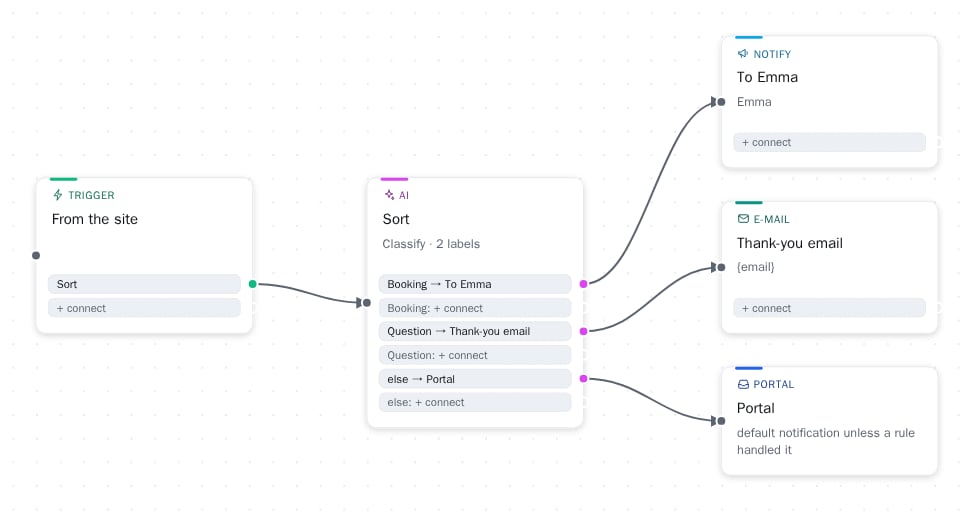
Automation board (beta)
The Automation page now has a board: From Site → To Portal is the default, and steps are dragged in between. The filter branches based on field value, Wait delays, Fetch retrieves yesterday's leads, AI classifies or picks fields, and delivery goes to Slack, Teams, HubSpot, Pipedrive, email, or your own webhook. The start can also be Timer ("every morning at 8") or External System (another system calls the board's address). Ready-made templates handle the most common cases with one click, Test shows what would happen, and the Runs log tells what happened. A failed step can be retried.
Campaigns (beta)
A named period during which campaign widgets are visible and regular ones are bypassed. The Christmas popup automatically replaces the regular one from December 20-26, and automation receives information about the start and end of the campaign.
Paths can calculate
You can add Calculate steps to chat and form paths: base fee + tiers(billing, "1-25: 2.5, 26+: 2") calculates a tiered price, and the result is printed in a message or directs branching. The numbers are kept in Settings Defaults table, so changing the price is a change of one number. The first use is an accounting firm's price calculator in chat.
The context of every lead
In Submissions, a lead now shows the path the visitor took (questions and selected answers) as well as the page from which the form was submitted, the result page, and the widget. Fields appear with their own names in the widget. The same background flows to webhooks and automation conditions.
Booking straight from the form
A form can now carry a Calendar field: the visitor sees a month view where only days with free slots can be picked, and the chosen day's free slots as buttons. Slot length, opening hours, closed weekdays and how far ahead one may book are set on the field. Two bookings can never land on the same slot, and if a slot goes between the visitor's choice and the submission, the form asks for another one. Bookings appear on the workspace's Bookings page, and on the Growth and Business tiers each booking creates an event in your own calendar: the CalDAV connection works with Nextcloud, iCloud, Fastmail and most email services (Settings › Calendar). Google Calendar and Microsoft 365 come later.
A widget anywhere on the page
A form or popup placed inside the page no longer needs its own container on the page: In the Placement section, you write the selector of any existing element on the page and choose whether the widget comes inside, before, or after it. The Settings "Check Installation" tells whether each placement target is found on the homepage.
The chat button moves out of the way
The chat button automatically rises higher when another fixed element, such as an up arrow or a cookie bar, comes under it, and returns when it disappears. The new Layer setting in the Theme adjusts how high the widgets are above the page.
Cookie consent and Google Analytics
Visitor analytics can be set to wait for cookie consent: until then, page views and clicks are counted without an identifier and nothing is written to the visitor's device. Cookiebot, OneTrust, CookiePro, Complianz, Usercentrics, Klaro, and Google’s Consent Mode are recognized automatically; for other banners, one line is sufficient. A separate switch sends form submissions, goals, and widget openings to the site’s own Google Analytics, without the content of the forms.
Smaller updates
- The popup button is now multilingual and can close the popup or open a link.
- The Activity page's Widgets section shows openings, option clicks, and submissions by widget.
- Scripted chat changes language with the site, even in an ongoing conversation.
- The portal's language selection remains selected when opened from bookmarks and links.
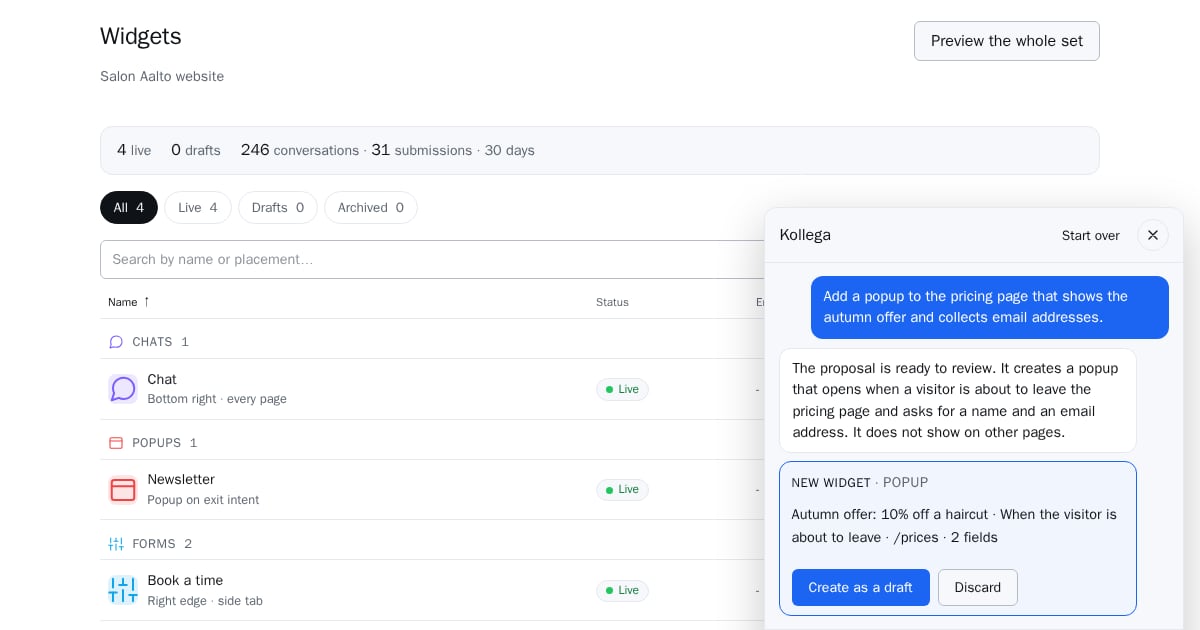
- Kollega builds the automation board from one sentence. Read more about Kollega.
Feedback is welcome: contact us.